Manufacturing Intelligence Engine

Ask your plant anything. Hear about problems first.

MIE watches every tag on every machine, escalates alerts until a person acknowledges, and answers plain-English questions from your real plant data.

HTTPS, MQTT, OPC-UA, ModbusAlerts on Slack, WhatsApp, webhookOnly known machines and tags
mie.thinklytixai.com/plant15s
Meridian Power & Steam / Plant overview
Plant statusAll normal9 machines · 54 of 54 tags
Drum Level62.45%BOILER-01 · avg 63.03 · 6 h
Discharge Pressure6.86barCOMP-01 · avg 7.04 · 6 h
Open alerts0▲ 0 critical · ◆ 0 warning
Data intake0rejected, 24 hEvery tag reporting
Basin Temperature29.79°CCT-01 · limit 33
Data inHTTPSMQTTOPC-UAModbus Alerts outSlackWhatsAppWebhook
How data moves

From the machine on the floor to the person who needs to know.

Every reading travels the same path: collected at the machine, checked, stored, watched, and turned into something a person can act on. Hover the steps to follow it.

MIE data flow Machines on the plant floor send readings through an edge gateway into the MIE engine. The engine collects, checks, stores and watches each reading. Unknown readings go to the rejected-data log. The rest reach dashboards, alerts, Ask, client summaries and, later, MIE Carbon.

Swipe sideways to follow the data →

0readings in
0rejected and logged
0alerts sent
See it in action

A 30-second tour of a real plant.

Recorded on the Meridian Power & Steam demo plant: nine machines, live readings and real alerts firing.

mie.thinklytixai.comdemo plant
54tags streaming from 9 machines on the demo plantLIVE · DEMO PLANT
3escalation channels, with timed tiers that stop on acknowledgeSLACK · WHATSAPP · WEBHOOK
0unknown tags accepted. Every reject is logged with its reasonDATA INTAKE
15sdashboard refresh, on the desk or on the control-room wallPLANT OVERVIEW
The product

Six parts of one engine, all on the same plant data.

01 Plant overview

Every machine, every tag, one glance.

Open MIE and the plant tells you where it stands: overall status, the readings closest to their limits, open alerts and data intake.

  • Closest to a limit. The charts that need attention first, with the limit line drawn in.
  • Filter by process or machine. Companies, processes and machines stay organised the way your plant is.
  • Wall mode. A TV-ready view for the control room that refreshes every 15 seconds.
mie.thinklytixai.com/plant
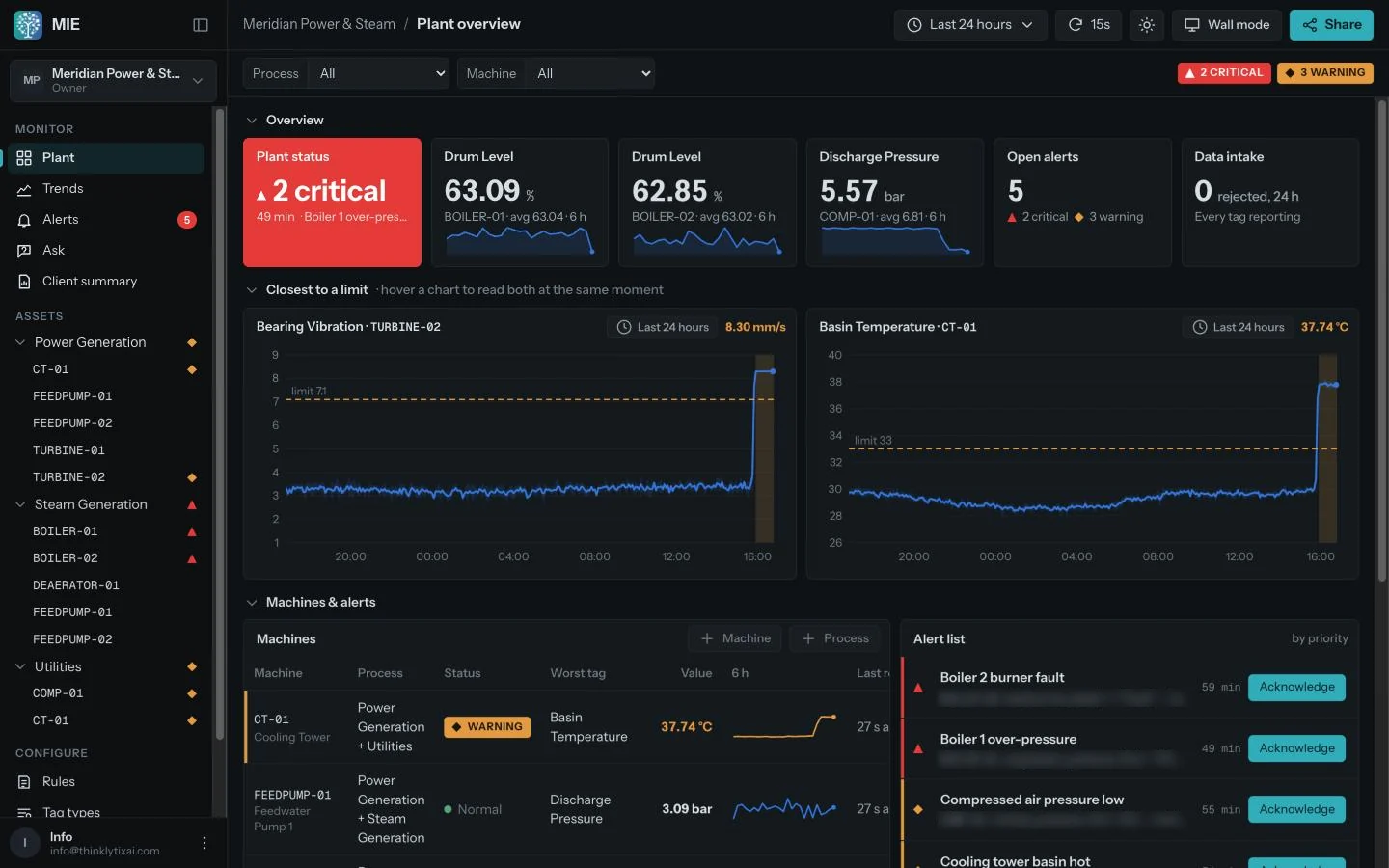
MIE plant overview: plant status showing 2 critical, drum level and discharge pressure tiles, open alerts, and bearing vibration and basin temperature charts crossing their limits
2 criticalBoiler 1 over-pressure 49 min

PLANT OVERVIEW · REAL SCREEN FROM THE DEMO PLANT
02 Alerts & escalation

Alerts that reach people, not inboxes.

Set a rule once. When it breaks, MIE tells the right person first and keeps climbing until someone takes it.

  • Slack, WhatsApp and webhook. Send to the channel your team already watches.
  • Timed tiers. Shift lead now, maintenance in 10 minutes, plant manager in 30.
  • Stops on acknowledge. One tap ends the escalation and records who took it.
  • Priorities and durations. Ignore a two-second blip; act on a ten-minute drift.
mie.thinklytixai.com/alerts
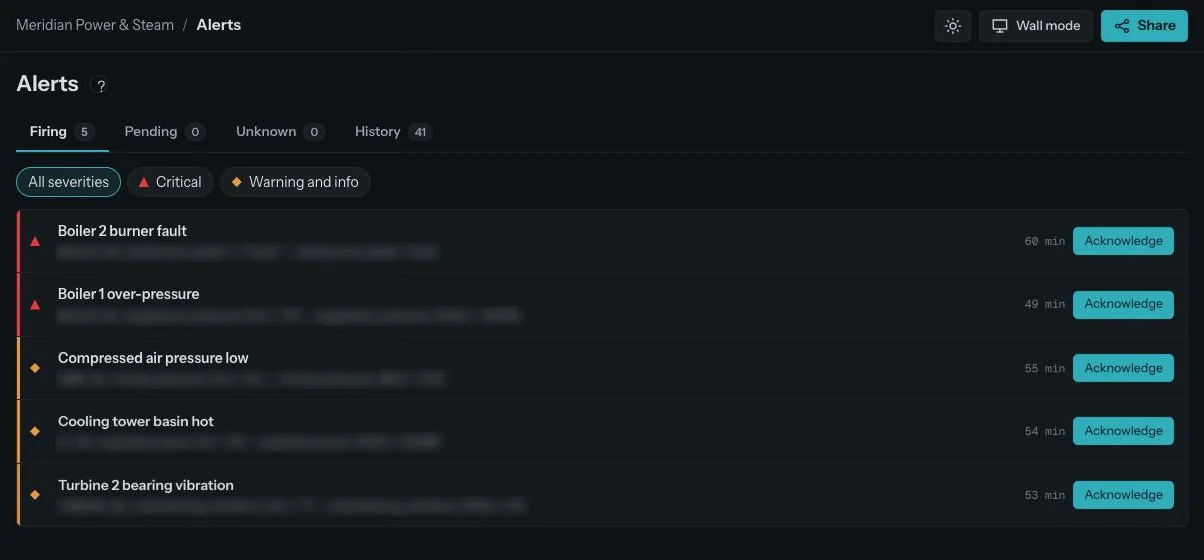
MIE alerts page with five firing alerts sorted by priority, each with its rule and an Acknowledge button
Acknowledgedescalation stopped

ALERTS · FIRING, SORTED BY PRIORITY

03 Ask anything

Plain-English questions, answered from real plant data.

Plant managers shouldn't need a data analyst to find out what happened yesterday. Type the question the way you'd say it.

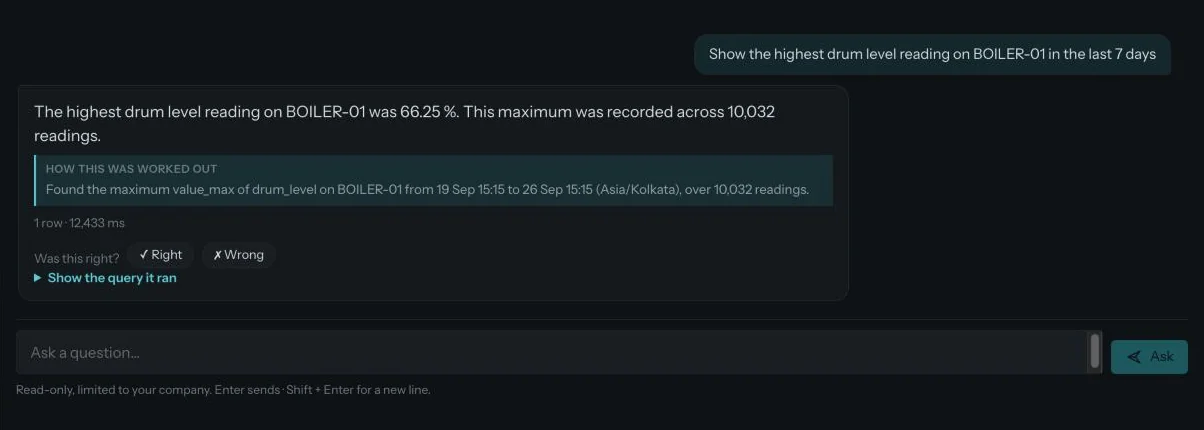
  • Shows its working. Every answer comes with the query MIE ran.
  • Read-only, limited to your company. Ask can look but never change anything.
  • Scheduled questions. Get the same answer every morning in Slack.
mie.thinklytixai.com/ask
MIE Ask answering: the highest drum level reading on BOILER-01 was 66.25 percent across 10,032 readings, with how it was worked out
1 row · 10,032 readings

ASK · A REAL ANSWER FROM THE DEMO PLANT

04 Trends & machines

See the drift before the limit breaks.

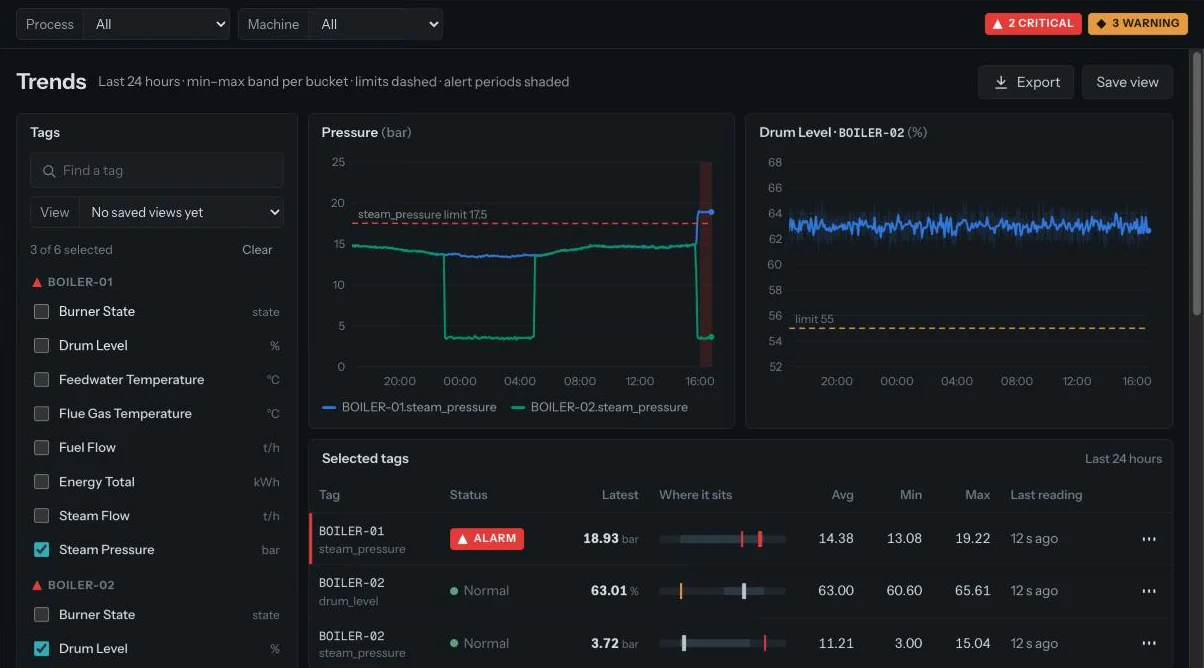
Twenty-four hours of every tag with its limits drawn in. Hover to read the exact value at any moment.

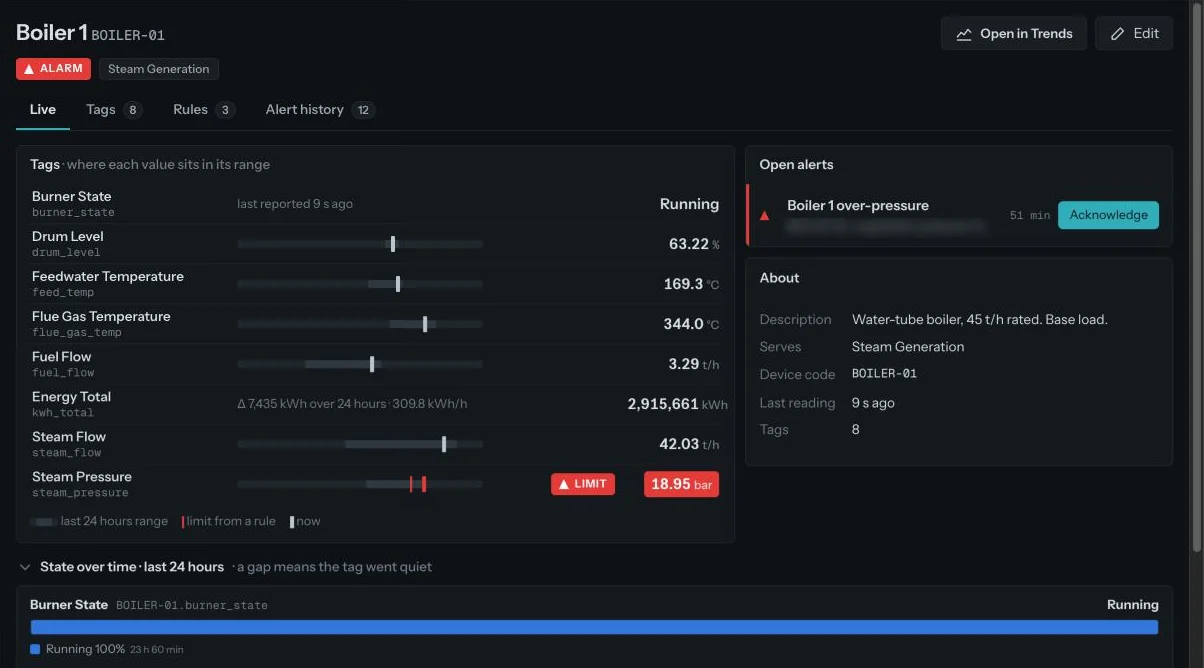
  • A page per machine. Every tag, its unit, its rules and its last reading.
  • Tag types. Define a limit once for every boiler drum level in the plant.
  • Synced hover. Read two charts at the same moment in time.
/machines/BOILER-01
MIE machine page for Boiler 1 showing each tag in its range, open alerts and details
mie.thinklytixai.com/trends
MIE trends: steam pressure for two boilers against a 17.5 bar limit, drum level against a 55 percent limit, and a table of selected tags with an alarm
Alarmsteam_pressure 18.93 bar

TRENDS AND MACHINE PAGE · REAL SCREENS

05 Data you can trust

Only known machines and tags. Everything else is logged.

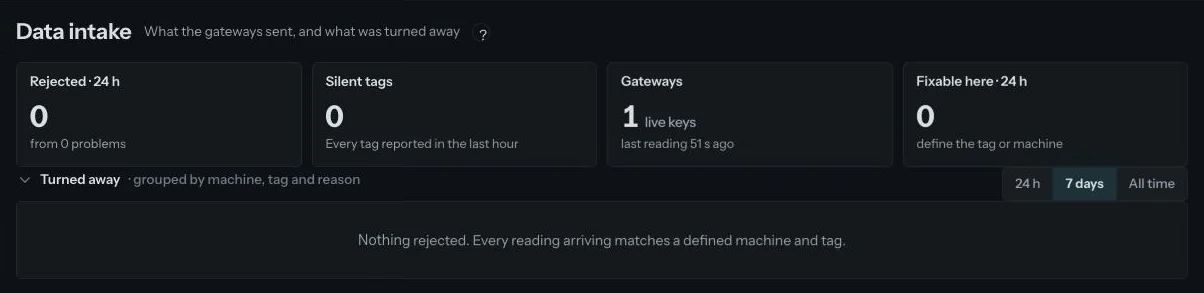
A chart is only as good as what feeds it. MIE shows what every gateway sent, refuses readings it can't place, and tells you exactly why.

  • Turned away, grouped. Rejected readings grouped by machine, tag and reason.
  • Silent tags. Know the moment a tag stops reporting, not days later.
  • Fixable here. Define the missing tag or machine in one step and the readings flow in.
mie.thinklytixai.com/intake
MIE data intake page: 0 rejected in 24 hours, 0 silent tags, 1 live gateway key, nothing rejected
0 rejectedevery reading matched

DATA INTAKE · WHAT THE GATEWAYS SENT

06 Client summary & embeds

Show your customers the value you deliver.

For machine builders and service teams: a clean summary of uptime, alerts handled and readings, ready to send or embed in your own portal.

  • Client summary reports. One page per customer, per period.
  • Embeddable dashboards. Drop a live view into your portal with one line.
  • Scoped per company. Each customer sees only their own machines.
  • What's likely next. Coming soon Predictive maintenance in every summary: which machine is likely to need attention, roughly when, and what to check first.
mie.thinklytixai.com/summary
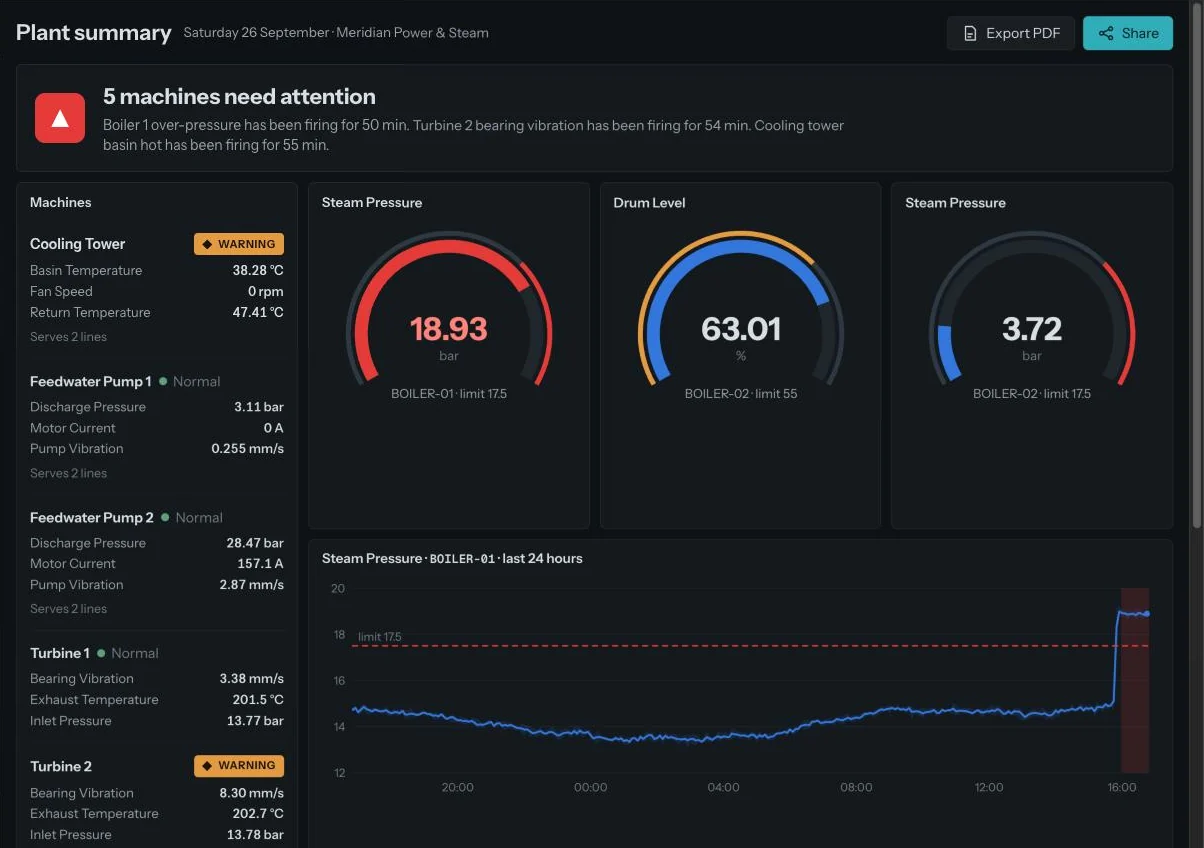
MIE client summary: five machines need attention, machine status list, steam pressure and drum level gauges, and a 24-hour steam pressure trend
Likely nextPreview
Turbine 2 · bearingService likely needed in 1–2 weeks
Medium
Boiler 1 · steam pressureRepeat over-pressure likely this week
High
Feedwater pumpsNo action expected this month
High
Coming to Client summary

CLIENT SUMMARY · REAL SCREEN, WITH THE UPCOMING “LIKELY NEXT” PANEL

Wall mode

Put the plant on the control-room wall.

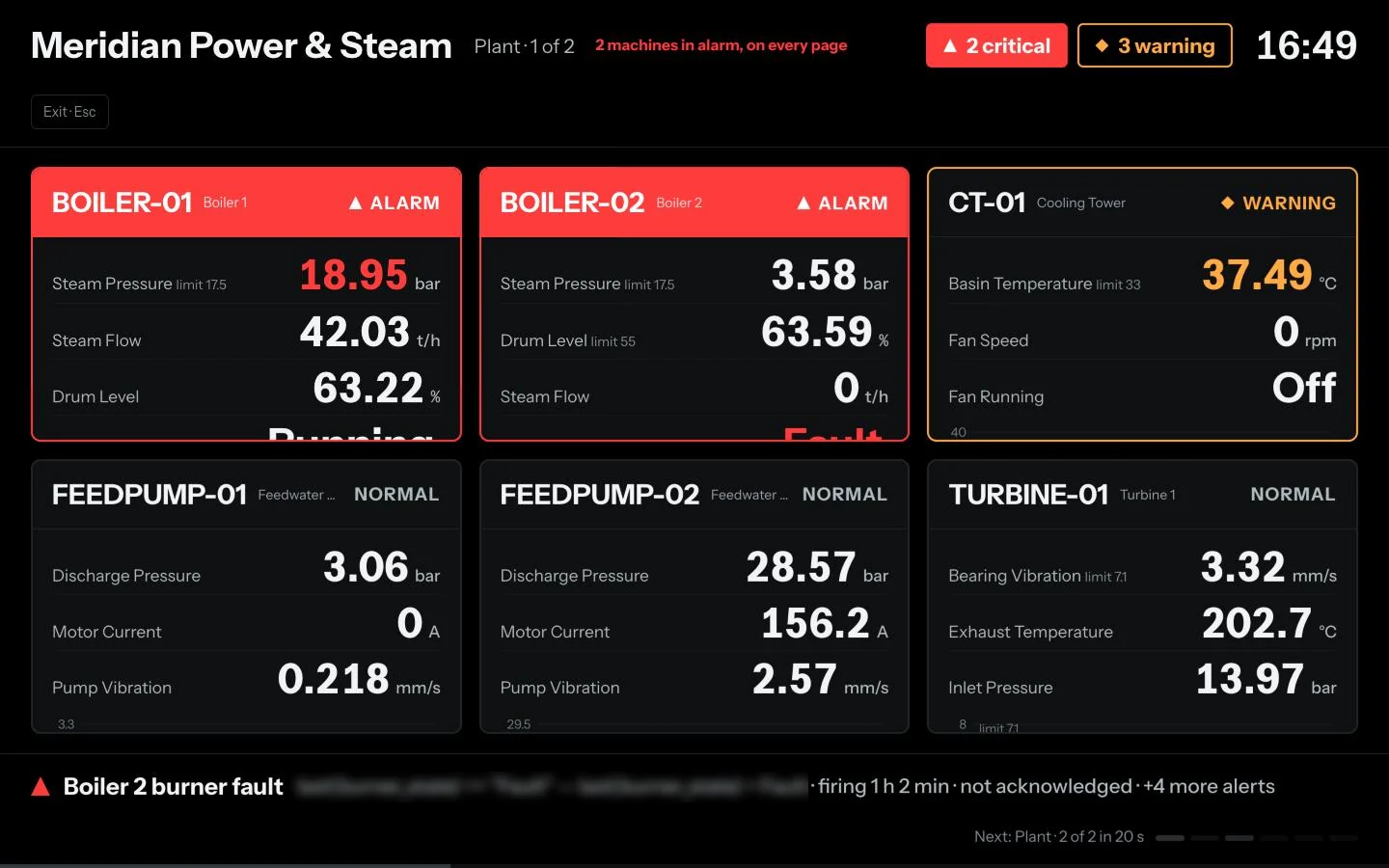
One click turns MIE into a TV view: big numbers, alarms pinned to every page, and pages that rotate on their own.

  • Alarm cards turn red and stay on screen until acknowledged
  • A live ticker lists every firing alert and how long it has run
  • Readable from across the room, day or night shift
MIE wall mode: large machine cards with Boiler 1 and Boiler 2 in alarm, Cooling Tower in warning, the rest normal, and a ticker of firing alerts
Signal to decision

Raw readings are noise. Tune them into a decision.

Straight off the machine, a tag is jittery, has gaps and the odd impossible value. Turn the dial to see what MIE does with it.

StageRaw
Bad values6
Gaps1
StatusUnclear
TURBINE-02 · bearing vibrationmm/s · live
Production goals & predictive maintenance Next

Know the month is slipping while you can still save it.

MIE already records every machine at the client site. Next, it turns that record into two things owners ask for most: is this month's production goal still on track, and which part is likely to fail before it does.

Production goal · SeptemberLine 1 · plan 2,000 units a day
On track
Produced so far0
Projected month end55,000
Monthly goal55,000
Gap0
goal 55,000
  1. —Watching Line 1 output against the monthly goal.
Predictive maintenance loopTurbine 2 · bearing
Early sign
  1. Early signA reading starts drifting from normal
  2. Heads-upOwner gets a plain-language warning
  3. AcknowledgedSomeone takes it and books a check
  4. FixedThe outcome is recorded against the machine
  5. LearnsThe next warning for that machine is sharper
Custom dashboards Next

Describe the dashboard. MIE builds it.

Today a plant manager asks a junior, who asks the product team, who exports sheets, builds a chart and sends a link days later. With MIE the manager just asks, and the dashboard appears in their menu.

The usual way
  1. Manager asks
  2. Junior writes it up
  3. Product team exports sheets
  4. Builds and shares a link
Days
With MIE
  1. Ask in plain English
  2. Review the draft
  3. Pinned to your menu
Minutes
  • Lives inside MIE. Every dashboard sits under Custom dashboards in the same menu as everything else.
  • Always live. Built on the plant's own data, refreshing like the rest of MIE. No exports, no stale sheets.
  • Need something bespoke? Our team delivers it within one working day, with no code changes on your side.
mie.thinklytixai.com/dashboards
Build
 
Output today1,942/ 2,000
Downtime this week7.4hCOMP-01 leads · 4.1 h
Output vs target · daily
Energy per unit · kWh
For OEMs & machine builders

Monitor the machines you've already sold.

MIE was built multi-tenant from the start. Run remote service for every customer from one place, and give each customer their own view.

CompaniesOne per customer, fully separated data and users.
ProcessesSteam generation, utilities, packaging lines.
MachinesEvery unit you shipped, with its tags and rules.
Talk to us about OEM plans
MIE Carbon · In development

From plant data to carbon credits you can report.

The readings that keep your plant running also describe its energy use and emissions. MIE Carbon turns them into a live view of emissions, reductions and the credits your plant could earn, and brings farmers who store carbon on their land onto the same platform.

For plant owners

See the credits your plant is generating.

  • Emissions by plant, process and machine, month by month
  • Reductions against your own baseline
  • Estimated credits and where each one is in verification
For farmers

Turn farm practices into carbon records.

  • Records for trees, soil and low-emission practices
  • Farms grouped so small holdings can take part together
  • Simple records a farmer can share or submit
For reporting

Records ready for government and ESG reporting.

  • Reports in the formats regulators and buyers ask for
  • A full history behind every number
  • One place for plants, farmers and verifiers
mie.thinklytixai.com/carbon
Carbon · Meridian Power & SteamThis financial year
Emissions, this month1,284tCO₂eScope 1 and 2 · 9 machines
Reduction vs baseline−8.6%YTDBoilers and compressors lead
Estimated credits212creditsPending verification
Farmer network146farms38,400 trees on record
Monthly emissions vs baselineActualBaseline
08001.6k AprMayJunJulAugSep
318Measured
212Estimated
0Verified
0Issued
Why now

India's Carbon Credit Trading Scheme is building one national market for industry, and farmer groups can now pool small farms to take part.

Why MIE

MIE already collects live machine data at client plants. The inputs for carbon tracking are flowing today.

One platform

Plant owners, farmers and reporting teams work from the same records, under the MIE name.

How MIE compares

Built for the people who run the plant.

Remote-access tools connect machines. Monitoring tools chart them. Data platforms need developers. MIE puts answers and alerts in front of plant managers.

Remote-access toolsMonitoring & OEE toolsIndustrial data platformsMIE
Plain-English questions on plant dataNot offeredSome, operator-facingFor developersFor plant managers, with the query shown
Escalation that reaches peopleEmail and pushEmailBuild it yourselfSlack, WhatsApp, webhook, timed tiers
OEMs monitoring machines they soldYesSingle siteCustom workCompanies → processes → machines
Rejected-data logNot shownNot shownPartialEvery reject, with the reason
Client summary and embedsPortal onlyNot offeredCustom workReports and embeddable dashboards
How teams use MIE

Three problems MIE is built to end.

Maintenance · Power & steam

The 3 a.m. pressure drop

BeforeThe night shift finds out at handover, hours after it started.
With MIEWhatsApp reaches the on-call engineer within minutes, and escalation stops the moment someone takes it.
Plant manager · Process

"What happened yesterday?"

BeforeAn export, a spreadsheet and half a morning for one answer.
With MIEAsk in plain English and get the number, with how it was worked out underneath.
Service · Machine builder

Forty customer sites, one team

BeforeSite visits and phone calls to learn how machines in the field are doing.
With MIEEvery site in one view, and a monthly summary each customer can see.
Plant check-up

Tell us what hurts. We'll show you where it comes from.

Every plant we work with starts the same way: we listen before we connect anything. Pick what sounds like your plant and watch the diagnosis tune in.

Diagnosis Tuning in 1 problem picked
    We start the call from your answers.
    1. Day 1Listen

      A call and a walk through your plant. We note the problems in your words, not ours.

      Your time: about an hour
    2. Week 1Map

      Machines, tags, limits, shifts and goals. We agree what "good" looks like for your plant.

      Your time: a list of machines and targets
    3. Week 2Connect

      We set up the gateway over HTTPS, MQTT, OPC-UA or Modbus. Readings start flowing and get checked.

      Your time: access to one gateway or PLC
    4. Week 3–4Prove it

      First alerts reach the right people, first answers from Ask, first client summary. We review them with you.

      Your time: one review meeting
    Security & your data

    Your plant data stays yours.

    Plant data is sensitive. MIE is built so it stays protected, separated and under your control, wherever it runs.

    Ask about deployment options
    Encrypted everywhere

    TLS 1.2+ in transit. AES-256 at rest with keys managed in AWS KMS.

    Access you control

    Role-based access and multi-factor sign-in, with monitoring and audit logs.

    Never used to train AI

    Your data is not used to train or fine-tune any AI model. Ask is read-only.

    Isolated per client

    Each company's data, queries and answers are kept separate from every other.

    Deploy your way

    Our cloud, your own VPC, a private tenant, or hybrid.

    You own it

    Your raw data, derived data and insights. Clear retention and deletion.

    Found a security issue? Write to info@thinklytixai.com. We appreciate responsible disclosure.

    Roadmap

    Live at client plants today. Here's what's next.

    MIE is running for our first industrial clients. This is where the platform goes from here.

    Live nowIn use
    • Plant overview and wall mode
    • Alerts with Slack, WhatsApp and webhook escalation
    • Ask in plain English, read-only
    • Trends and a page per machine
    • Data intake and the rejected-data log
    • OPC-UA and Modbus connectors
    • Client summary with PDF export and sharing
    LaterPlanned
    • MIE Carbon: emissions, reductions and credit tracking
    • Farmer network with carbon records per farm
    • Government and ESG reporting packs
    • Verifier and registry connections
    • Hindi and regional languages across the app
    Pricing

    Priced per machine. Unlimited users.

    Start with one plant. Add machines as you connect them.

    10
    Monitor
    $49 / machine / month

    Dashboards, trends and alerts for one plant.

    • Plant overview and wall mode
    • Trends and machine pages
    • Slack alerts
    • Rejected-data log
    • Unlimited users
    Start with Monitor
    Most chosen Operate
    $99 / machine / month

    Everything in Monitor, plus Ask and full escalation.

    • Ask anything, with scheduled questions
    • Timed tiers: Slack, WhatsApp, webhook
    • Stop on acknowledge
    • Client summary reports
    • Priority support
    Book a demo
    OEM
    Custom
    Volume pricing across customer sites

    For machine builders serving many customer sites.

    • Multi-company tenancy
    • Embeddable dashboards
    • Per-customer summary reports
    • SSO and audit log
    • Dedicated onboarding
    Talk to us

    Prices in USD, billed monthly. Starting prices; volume discounts for larger fleets.

    Questions

    What teams ask before they connect.

    Do we need new sensors or hardware?
    No. MIE takes the readings you already have over HTTPS, MQTT, OPC-UA or Modbus, from your PLC, gateway, historian or edge device.
    Can Ask change anything in our plant?
    No. Ask is read-only and limited to your company's data. It shows the query behind every answer so you can check it.
    What happens to data from a machine we haven't registered?
    It's rejected and written to the rejected-data log with the reason, so it never reaches a chart, a trend or an alert.
    What systems does MIE connect to?
    Machines and controllers over HTTPS, MQTT, OPC-UA and Modbus. Business systems such as SAP, Oracle, Microsoft Dynamics, SQL Server, PostgreSQL and Excel. Our team handles the mapping during setup.
    Is our data secure?
    Yes. Data is encrypted in transit and at rest, access is role-based with multi-factor sign-in, each client is isolated, and your data is never used to train AI models. MIE can run in our cloud, your own VPC, a private tenant or hybrid.
    Does MIE replace our SCADA or historian?
    No. It sits alongside them. Your control system keeps running the plant; MIE watches the data, escalates problems to people and answers questions.
    How do escalation tiers work?
    Each rule has a list of tiers, each with a channel, recipients and a delay. The alert moves to the next tier until someone acknowledges it, then escalation stops and the acknowledgement is recorded.
    Can we white-label MIE for our customers?
    On the OEM plan, each customer gets their own company space, and you can embed dashboards and send summary reports under your brand.
    Is MIE Carbon available today?
    Not yet. MIE Carbon is in development and builds on the plant data MIE already collects. Early clients will get it first; talk to us if you'd like to be part of the pilot.
    Which features are live and which are coming?
    Everything in the product sections above is live today, except items marked "Coming soon". The roadmap section shows what we're building next.
    How is pricing calculated?
    Per connected machine per month, with unlimited users on every plan. OEM plans are priced on your fleet size.
    MIE is built by ThinklytixAI

    AI that thinks ahead, built with the people who run plants.

    We started ThinklytixAI after watching plants struggle with scattered data, slow decisions and constant firefighting. We believed there was a better way: one layer that brings the data together, sees problems coming and gets the right person moving.

    MIE is that layer for manufacturing. It is designed with plant managers, maintenance teams and machine builders in the loop, and it is running at client plants today.

    • 01Proactive by design

      Warn and recommend before the issue reaches the floor.

    • 02Human-centred

      MIE supports your team's judgement. It never replaces it.

    • 03Outcomes over features

      We measure ourselves by stops avoided and hours saved.

    • 04Built with operators

      Every screen is shaped by people who run shifts.

    See it on a real plant

    Ask the demo plant your own question.

    Nine machines, fifty-four tags, live data. We'll walk you through it in 30 minutes.

    Or call +91 98288 93692 · +91 83174 54076 · info@thinklytixai.com

    Book a demo →Watch the tour
    Talk to us